Thai AI Voice Cloning is Here! Meet the Tech Anyone Can Try Right Now

 May 13, 2026


Introduction
Ever finished a massive project only to find a glaring typo in your voice-over script? Or maybe you just wrapped up recording an entire online course, and suddenly the curriculum updates, forcing you back to square one. If you’re a content creator or a teacher trying to keep materials fresh, you know the tedious process of setting up the mic and re-recording.
But what if you could just type the edits and have your own voice say them?
Enter voice cloning. It’s no longer just sci-fi movie magic, and in this post, we’re going to show you how you can clone your own voice in under a minute.
What Exactly is Voice Cloning?
Think of Voice Cloning as letting an AI learn the unique blueprint of your voice—your pitch, tone, accent, and rhythm. Once trained, the AI can “speak” entirely new sentences using your voice, without you ever having to step foot in a recording booth again.
Just feed the AI a short audio clip of yourself, type out whatever you want to say, and instantly, you have a personal voice actor that sounds exactly like you, on call 24/7.
Traditional TTS vs. Voice Cloning: What’s the Difference?
You’ve definitely interacted with Text-to-Speech (TTS) before—think Siri or the Google Maps navigation voice. But voice cloning isn’t your standard TTS.
While traditional TTS uses rigid, pre-packaged synthetic voices that you can’t easily modify, voice cloning creates a personalized audio profile. It captures your distinct nuances and personality, sounding completely natural instead of robotic.
How AI Voice Cloning Actually Works
It might sound highly complex, but the process really breaks down into four straightforward steps:
- The “Listening” Phase: You upload an audio file, and the AI analyzes your unique vocal traits. It doesn’t just hear you; it learns the specific mechanics of how you speak.
- Mapping the Script: When you type out a new text, the AI plans the delivery. Where should it emphasize a word? When should it raise its pitch or pause for a breath? It’s essentially doing a mental read-through.
- The Voice Generation: The AI merges your vocal characteristics (from Step 1) with the delivery plan (from Step 2) to generate the speech in your exact accent and tone.
- The Final Polish: Finally, the system refines the audio so it sounds fluid, natural, and human, smoothing out any robotic edges.
Why is Thai So Hard for AI to Master?
If you’ve ever tried using western TTS or cloning tools for Thai, you’ve probably noticed they sound unnatural. That’s because the Thai language has unique linguistic challenges that most global AI models stumble over:
- Tonal Complexity: Thai is a tonal language. Mess up the tone, and you change the entire meaning of a word. For instance, “ข่าว” (news) and “ข้าว” (rice) sound incredibly similar to untrained ears. If the AI gets the tone wrong, the illusion is instantly broken.
- Code-Switching: Thais frequently mix English into their daily speech. If an AI is reading a sentence like, “ระบบ AI มัน process ข้อมูลได้เร็วมาก,” it needs to pronounce “process” with a localized Thai-English accent. If it suddenly switches to a native British or American accent mid-sentence, it sounds jarring.
- Contextual Numbers: Reading numbers is notably difficult. “1,500 บาท” needs to be read as “one thousand five hundred baht.” But a phone number like “02-123-4567” needs to be read digit-by-digit. AI can’t just blindly read numbers the same way every time.
- The Data Shortage: Compared to English, there’s a massive shortage of high-quality Thai audio data available for global AI systems to train on. General-purpose models simply don’t have the data to get Thai right.
Enter JaiTTS: The Voice AI Built Specifically for Thai
Developed by Jasmine Technology Solution (JTS), JaiTTS was built from the ground up to solve all of these exact challenges.
Crystal Clear Pronunciation
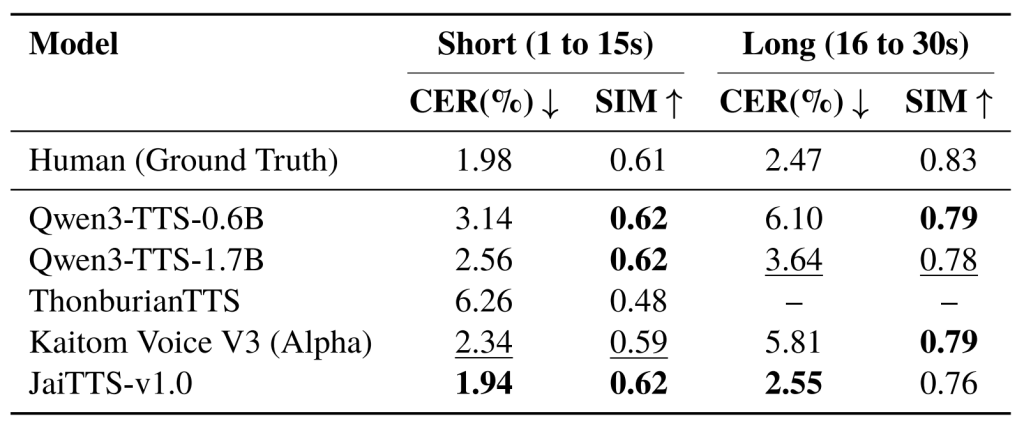
Our model boasts an incredibly low error rate. In fact, during testing, there were times the AI sounded clearer and more articulate than the original human recording. Say goodbye to muffled or weirdly-accented AI voices.
Flawless Long-Form Audio
A common issue with generic AI is that it struggles with long scripts—the audio often distorts, skips, or sounds robotic over time. JaiTTS is engineered to keep the quality, pacing, and rhythm consistent, whether you’re generating a one-liner or a lengthy monologue.
9x Faster Than Real-Time
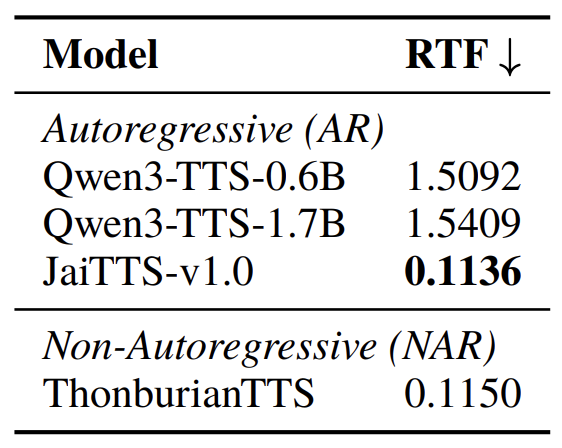
You won’t be kept waiting. JaiTTS generates a full minute of audio in under 7 seconds of processing time.
Handles Everyday Thai Naturally
Whether it’s numbers, transliterated words, or sentences blending Thai and English, the system processes it all automatically and naturally.
The Blind Test Winner
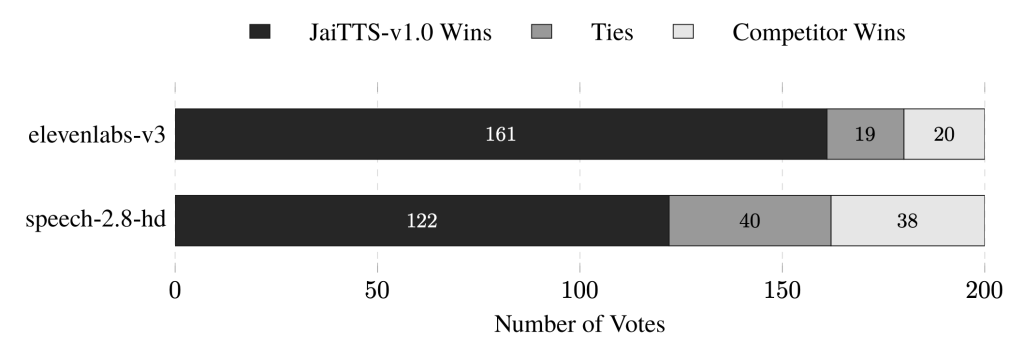
We put it to the test. In blind listening sessions, Thai native speakers chose JaiTTS 283 out of 400 times over heavyweights like ElevenLabs v3 and MiniMax speech-2.8-hd. When an AI is purpose-built for a specific language, the difference is undeniable.
Who is Voice Cloning Actually For?
You don’t need to be a software engineer to use this. If you have a voice and text you want spoken, this technology is for you.
- 🎬 Creators & YouTubers: Fix voice-overs on the fly without setting up your mic again. Just edit the text and let the AI patch the audio.
- 📚 Educators & Course Creators: Spin up course materials or update old lessons using your own voice, minus the studio time.
- 💼 Founders & Marketers: Automate your phone systems, store announcements, or ad scripts with your actual voice.
- 🎙️ Podcasters & Writers: Turn your articles, newsletters, or scripts into instant audiobooks and podcasts.
- ♿ Accessibility: Empower people with speech impairments to maintain their unique voice in digital spaces.
Try JaiTTS Right Now (In 4 Easy Steps)
Ready to see it in action? You can try JaiTTS right now, completely free of charge.
- Step 1: Upload Your Audio
Record a quick sample of yourself in a quiet room, or upload an existing audio file. The system will process it and automatically generate a transcript. - Step 2: Review the Transcript
Give the auto-generated text a quick read. If the AI misheard a word from your audio, correct it. A clean transcript is essential for generating a high-quality voice clone. - Step 3: Type Your Script
Enter the Thai or mixed Thai-English text you want the AI to speak into the target box. - Step 4: Generate & Listen
Click Clone Voice. In seconds, you’ll hear your AI counterpart reading the text back to you.
👉 Try JaiTTS for free at https://jaitts-demo.jts.co.th/
The Bottom Line
Thai voice cloning isn’t some distant technology of the future—it’s highly accessible and ready to use today. Whether you want to streamline your workflow or you’re just curious to hear your AI clone in action, JaiTTS is the tool built specifically for the job.
👉 Click here to try JaiTTS for free
For more details:
📄 Paper: https://arxiv.org/pdf/2604.27607
💻 GitHub: https://github.com/JTS-AI-Team/JaiTTS
🤗 Hugging Face: https://huggingface.co/JTS-AI
🌐 Website: https://jts.co.th/jai/